No Customs Hassles • Guaranteed Authenticity • 7-Day Free Returns

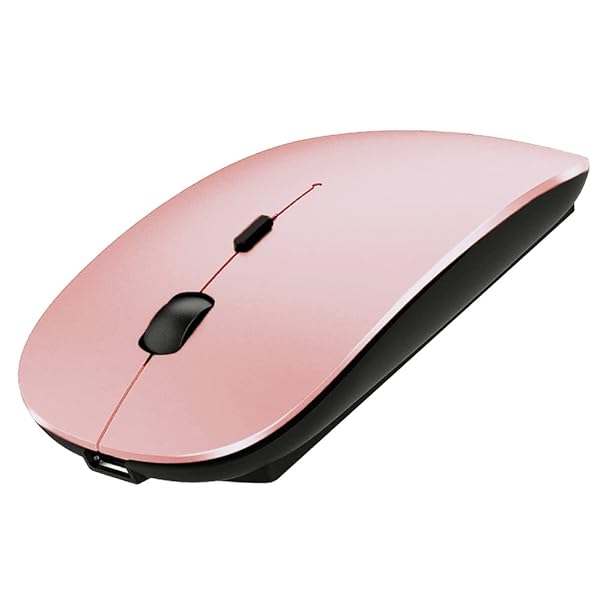
KLO Buy KLO Bluetooth Mouse for MacBook & iPad - Wireless Rose Gold Mouse for Laptops & Chromebooks
KLO

Buy KLO Bluetooth Mouse for MacBook & iPad - Wireless Rose Gold Mouse for Laptops & Chromebooks

SKU: B07WMQBDMP

3,272.83

All taxes and duties included | Tracking provided

In Stock
Estimated delivery: 14-21 business days
Qty:
Customs & duties included
100% authentic
7-day free returns
GST invoice available

- KLO Rechargeable Bluetooth Mouse for MacBook/MacBook air/Pro/iPad, Wireless Mouse for Laptop/Notebook/pc/iPad/Chromebook (Rose Gold-b) provides reliable performance and quality- 3DPI SWITCH:Using high-performance optical chips, up to 1600 dpi(800, 1200, 1600) accurately tracking,to meet different needs.

KLO Rechargeable Bluetooth Mouse for MacBook/MacBook air/Pro/iPad, Wireless Mouse for Laptop/Notebook/pc/iPad/Chromebook (Rose Gold-b)!Discover the KLO Rechargeable Bluetooth Mouse for MacBook/MacBook air/Pro/iPad, Wireless Mouse for Laptop/Notebook/pc/iPad/Chromebook (Rose Gold-b). Built for dependable performance, easy setup, and everyday value.Key features- Adopt bluetooth 3.0/5.2 technology, built-in 500mAH A product lithium battery, configuration charging line, like a mobile phone, easy to charge, more scientific, charge and discharge of more than 500 times, the mouse no longer need to buy a battery- size: 113mm x 58mm x23mm weight : 3.2 oz- package: Bluetooth mouse x1, USB Charging Cable x1- How to use Bluetooth wireless mouse:- Apple Mac MacBook/pro/Air : first, open the mouse switch, open the computer system preferences, open the bluetooth, when the computer Bluetooth display is searching for nearby Bluetooth devices, hold down the mouse button (at the bottom of the mouse small black button) and keep 3 to 8 seconds, and then your computer display the search bluetooth mouse, bluetooth device click on the link, and then the connection is successful- Win7/8/10/XP series notebook computer usage instructions: First, open the mouse switch, open the computer settings, open the device Bluetooth function, open add Bluetooth, open Bluetooth, when the computer Bluetooth display is searching for nearby Bluetooth devices, hold down the mouse button (at the bottom of the mouse small black button) and keep 3 to 8 seconds, and then your computer display the search bluetooth mouse, bluetooth device click on the link, and then the connection is successfulBenefits- Adopt bluetooth 3.0/5.2 technology, built-in 500mAH A product lithium battery, c- size: 113mm x 58mm x23mm weight : 3.2 oz- package: Bluetooth mouse x1, USB Charging Cable x1DetailsThis item is designed to deliver reliable results with minimal effort. It fits into a wide range of home and office setups, offering stable performance and consistent quality. Use it as a drop-in upgrade or as a trusted replacement to keep your workflow smooth.How to use- Unbox and review the quick start guide.- Inspect contents and verify compatibility.- Follow setup steps to connect and configure.- Test the product and keep the guide for reference.Ready to buyAdd the KLO Rechargeable Bluetooth Mouse for MacBook/MacBook air/Pro/iPad, Wireless Mouse for Laptop/Notebook/pc/iPad/Chromebook (Rose Gold-b) to your cart and enjoy a simple, reliable upgrade.

Why Buy From Poshace

Free International Shipping

On all orders

Free International Returns

Within 7 days

Lowest Price Guaranteed

We match competitors

International COD

On select orders

1 Year Warranty

Manufacturer warranty

Priority Support

24/7 customer care

Chat with us